
Alerts and notifications
Automated alerts so that nothing slips through
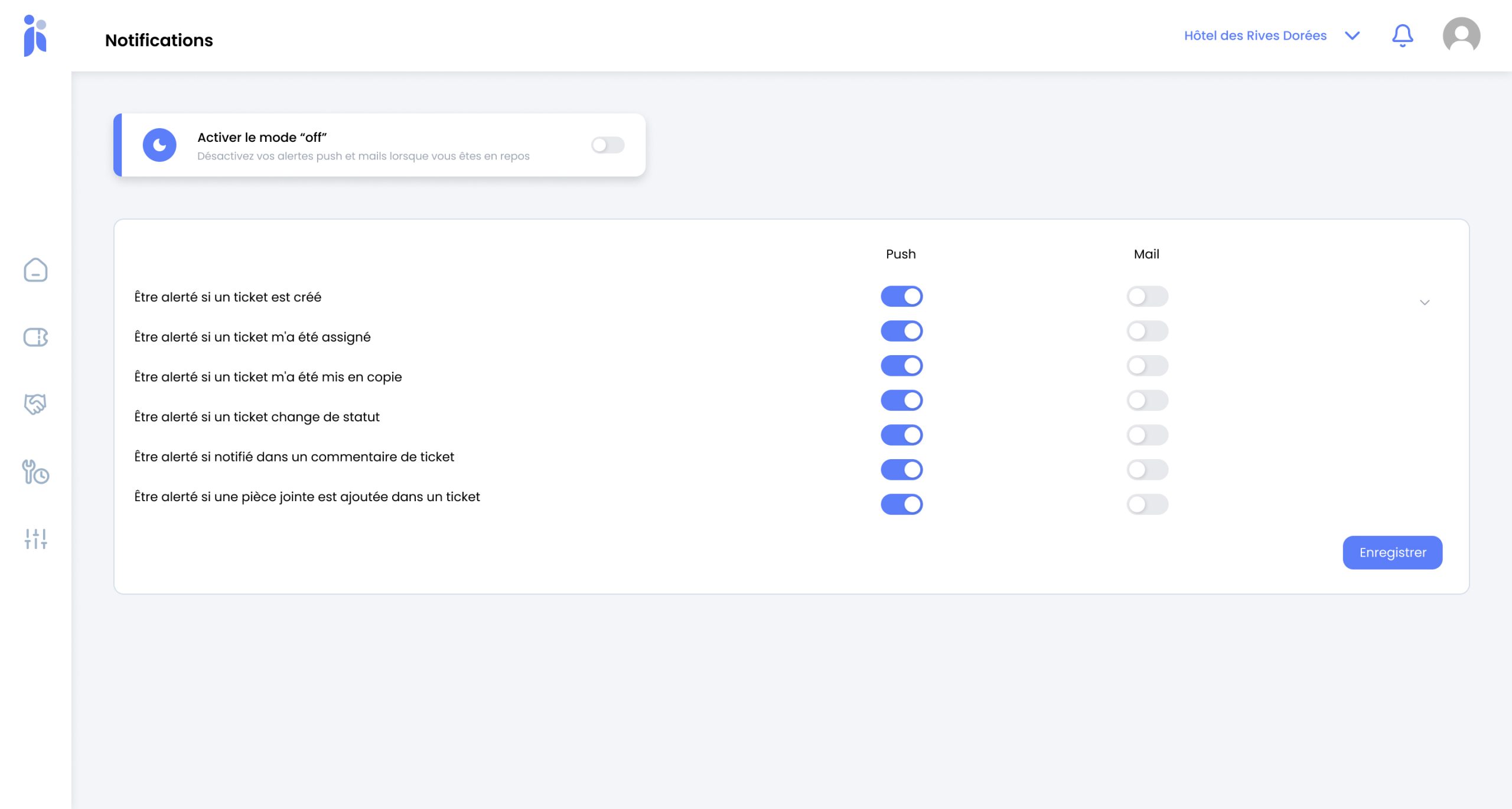
Every ticket raised, assigned, put on hold or closed sends the right notification to the person who needs it. No more chasing people down corridors, no more information dying in a passing conversation. What gets reported reaches someone who can act on it.
- Alert when raised
- Alert when assigned
- Alert when the status changes
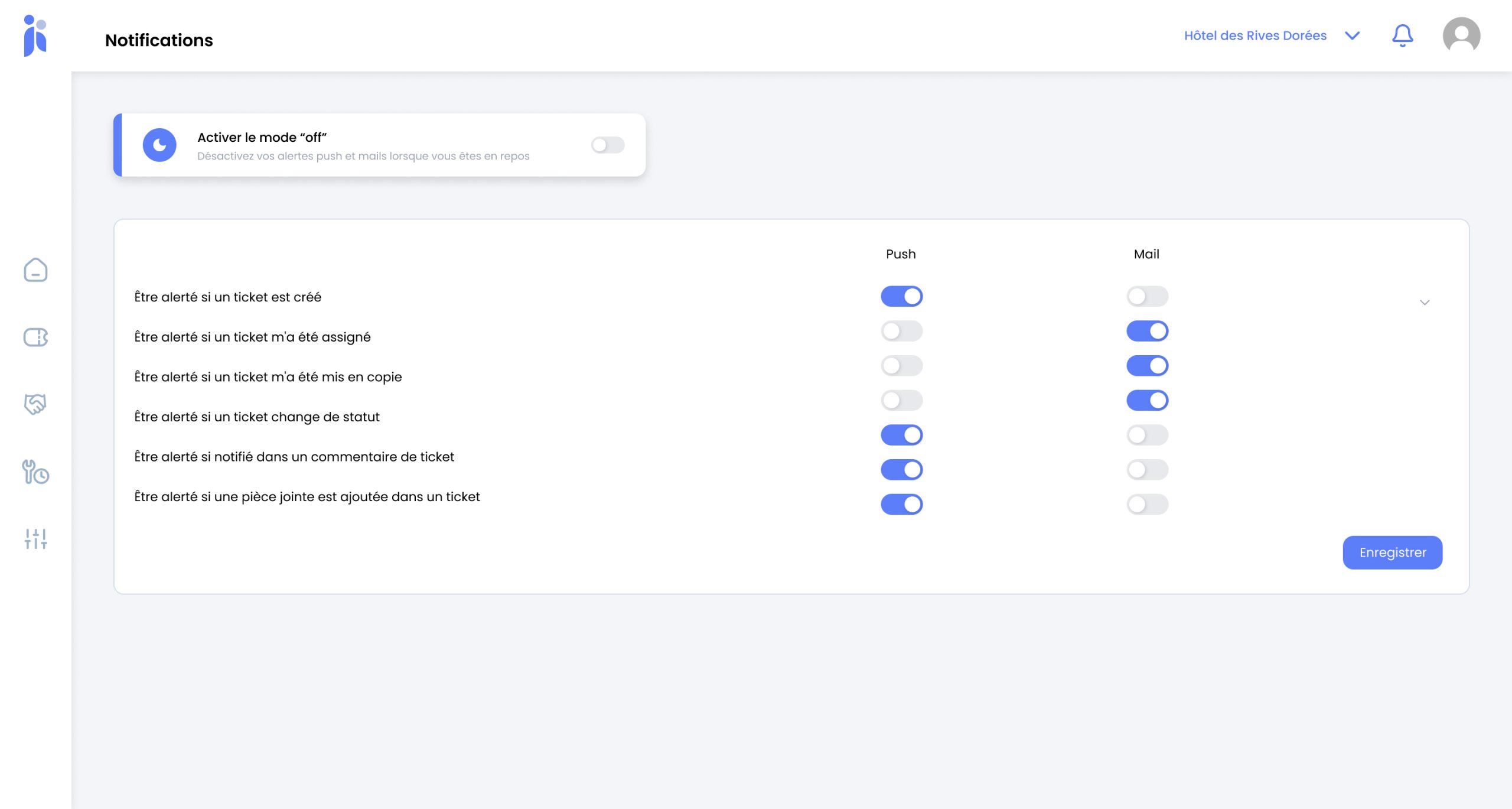
- Preferences per person
Maintenance information gets lost between departments
A room attendant reports a leak to the head housekeeper, who mentions it to reception, who will pass it on to the engineer « as soon as he has a spare minute ». Three relays later, and the leak waits until tomorrow.
In a hotel, maintenance is the one department that depends entirely on what the others report to it. The engineer does not see the rooms, he is told about their problems. Every intermediary adds a delay and one more chance of the job being forgotten — and nobody has any visibility over what fell through the cracks, precisely because it fell through the cracks.
Word of mouth
Information passed on verbally exists nowhere. If the person forgets, nothing remembers on their behalf.
The silence of a job on hold
A ticket waiting on a spare part can sit there for weeks: nobody is told that it has stopped moving.
Chasing, always chasing
Without notifications, the maintenance manager spends the day asking where each job has got to.
What Inara notifies you about
Alerts follow the life cycle of the ticket. Nobody has to remember to tell anyone: the event itself sends the message.
-
When a fault is reported
As soon as an issue is logged — from a workstation or from the mobile app — the department concerned is alerted. Reception does not have to work out who is on duty, nor check that the message actually arrived.
-
When a work order is assigned
The person or the contractor assigned receives a notification with the location, the description and the priority. They know what to do and where to go without phoning anyone.
-
When the status changes
To do, in progress, awaiting information, completed: every change keeps the people following the ticket informed. A job on hold stops being a job forgotten.
-
According to what each person wants to receive
The maintenance manager wants to see everything, the head housekeeper only what affects her floors. Everyone sets their own preferences, channel by channel, without being buried under traffic meant for someone else.
From word of mouth to automated alerts
The challenge is not a technical one: it is to stop passing information around by voice.
-
You set out your departments
Maintenance, housekeeping, reception, management: each department receives what concerns it, and none of the rest.
-
You assign the roles
Who can report a fault, who can assign a work order, who has to be kept informed. Permissions determine the notifications.
-
Everyone sets their own preferences
Email, in-app notification, or both. That setting is the difference between a useful alert and one people end up ignoring.
-
The floor reports instead of recounting
A room attendant raises the ticket from her phone the moment she sees the problem. The information travels on its own.
-
You keep track without chasing
Status changes come back to you by themselves. The morning meeting is there to weigh up priorities, no longer to take stock of what is still outstanding.
What you gain
Response times that get shorter. The report reaches the engineer without going through three people.
No more jobs lost along the way. What is logged exists, even once the person who spotted it has finished their shift.
Less chasing. Progress comes back to you instead of having to be asked for.
A flow everyone keeps under control. Adjustable preferences: nobody mutes their alerts because there are simply too many of them.
Reception freed up. They report the problem and move on, instead of acting as a technical switchboard.
Blocked jobs made visible. A ticket on hold flags itself rather than quietly sitting there.
Frequently asked questions
Which events trigger a notification?
The life cycle of the ticket: a fault being reported, a work order being assigned to a person or to a contractor, a change of status, completion. The principle is that every step that changes something for someone tells them so, with no human intervention.
Are we not going to be flooded with alerts?
That is the classic risk, and it is exactly why preferences are adjustable person by person and channel by channel. A maintenance manager wants to see everything; a head housekeeper only what affects her floors. An alert people end up ignoring is worth nothing: better to switch a few off than to put up with all of them.
Do external contractors receive notifications?
Yes. A job can be handed to an outside contractor and they receive the information just like an in-house colleague. It saves the confirmation phone call and leaves a written record of what was asked for, and when.
Does everyone need to have the app?
No. The people who report faults are better off having it on their phone, so they can log a problem the moment they see it, but email notifications are enough for those who follow jobs from a workstation.
What happens at night and at weekends?
Notifications go out whatever the hour; it is your on-call arrangements that decide what should wake somebody up. Preference settings and department assignments exist precisely for that.
Does it replace the morning meeting?
No, but it changes what that meeting is for. Instead of taking stock of what has been reported and what is dragging on — something everyone already knows — the meeting is used to weigh up priorities and settle the difficult cases.
Explore further
Other Inara features that keep technical information moving across your hotel.
Let us work out who needs to be told what
Thirty minutes on how your teams really work, your departments and your on-call rota. No commitment.